Choosing the right server infrastructure is a pivotal decision that impacts your company's performance, scalability, and budget. Instead of buying the most expensive hardware available, the goal is to align your computing power with your specific workload requirements.
Here is a comprehensive guide to navigating the world of modern server hardware.
01Defining the Core Need: DAS vs. NAS vs. SAN
The first step in choosing a server is determining how you will store and access your data.
Direct Attached Storage (DAS)
DAS is storage connected directly to the server (like internal hard drives or an external drive enclosure).
- Best For: Small businesses, individual workstations, or high-performance local databases.
- Pros: Lowest cost, simplest setup, and extremely high speed because there is no network bottleneck.
- Cons: Hard to share with other servers; if the server goes down, the data is inaccessible.
Network Attached Storage (NAS)
A NAS is a dedicated file-level storage device that resides on your network. Think of it as a private cloud.
- Best For: File sharing among teams, centralized backups, and media streaming.
- Pros: Easy to manage, allows multiple users to access data simultaneously, and is highly scalable.
- Cons: Performance is limited by your network speed (e.g., a 1Gbps vs. 10Gbps connection).
Storage Area Network (SAN)
A SAN is a specialized, high-speed network that provides servers with block-level storage.
- Best For: Enterprise environments with heavy virtualization (like VMware) and massive databases.
- Pros: High availability and peak performance.
- Cons: Expensive and requires specialized IT knowledge to manage.
02When Do You Need a GPU Server?
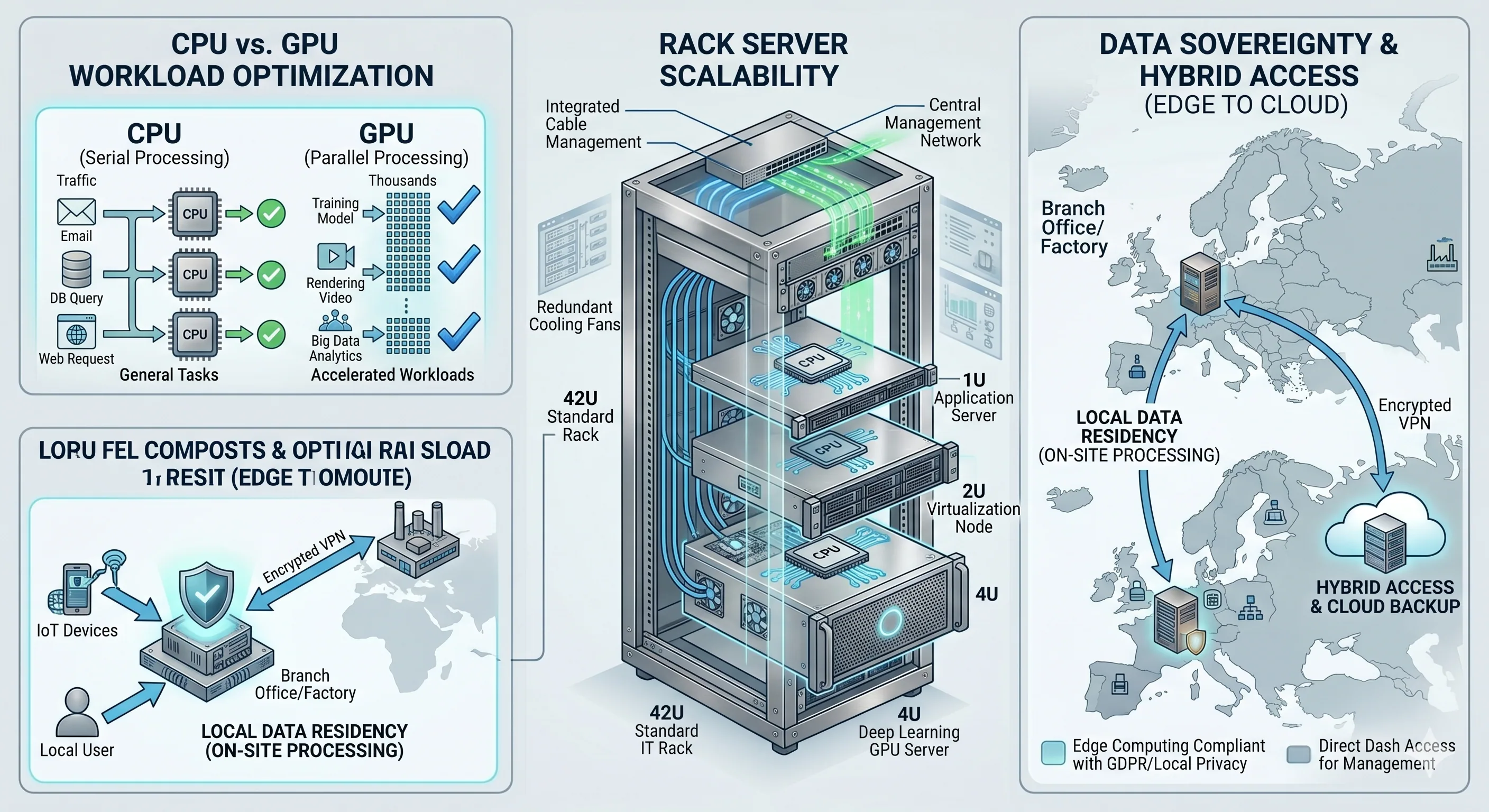
While a standard CPU (Central Processing Unit) handles general tasks, a GPU (Graphics Processing Unit) is designed for parallel processing. You need a GPU if your business involves:
- AI and Machine Learning: Training large models or running high-speed inference.
- Video Production: Rendering 4K/8K video or 3D animations.
- VDI (Virtual Desktop Infrastructure): Providing smooth graphical experiences for remote employees using heavy design software.
- Big Data Analytics: Processing millions of data points simultaneously.
03Server Form Factors: Tower vs. Rack vs. Blade
Where will the server live? Your physical space dictates your hardware choice.
- Tower Servers: Look like a standard desktop PC. They are quiet, don't require a cooling room, and are perfect for small offices without a dedicated server closet.
- Rack Servers: Designed to be stacked in a standard 19-inch rack. They are the industry standard for scalability and density.
- Blade Servers: Modular servers that slide into a chassis. They offer the highest density and power efficiency for massive data centers but come with a high entry cost.
04Key Hardware Specifications Checklist
To ensure your server stays relevant for 3 to 5 years, prioritize these specs:
- RAM (Memory): Never skimp here. For virtualization or databases, 64GB is a modern baseline; enterprise servers often start at 128GB or 256GB.
- Storage Type (NVMe vs. SATA): Always use NVMe SSDs for your Operating System and active databases. Use high-capacity SATA HDDs for long-term backups and cold storage.
- Redundancy: Ensure your server has Dual Power Supplies and a RAID controller. If one power outlet or one hard drive fails, your business stays online.
- Network Interface: Move toward 10GbE (10 Gigabit Ethernet) if you are handling large files or high-traffic applications.
05Cloud vs. On-Premise: The Hybrid Reality
You don't always have to buy physical hardware.
- On-Premise: Best for high-performance needs, strict data privacy, and long-term cost savings (Capital Expenditure).
- Cloud (AWS/Azure): Best for rapid scaling, testing new projects, and avoiding maintenance (Operating Expenditure).
- Hybrid: Many modern businesses keep sensitive data on a local NAS/Server but use the cloud for public-facing websites and remote backups.
06Hyperconverged Infrastructure (HCI) vs. Traditional 3-Tier
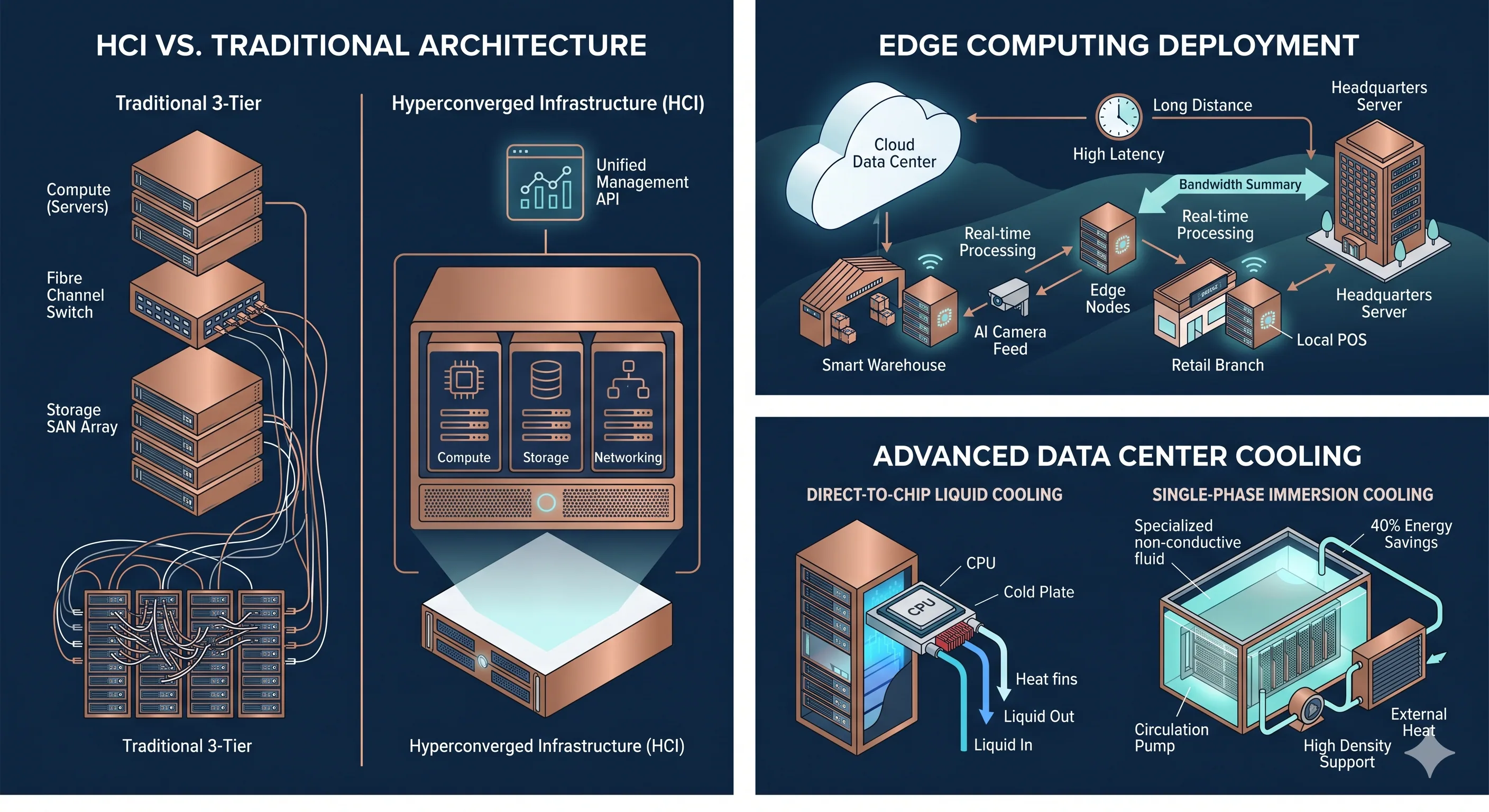
If you are tired of managing separate servers, storage arrays, and switches, HCI is your solution. It combines compute, storage, and networking into a single, software-driven system.
| Feature | Traditional (3-Tier) | Hyperconverged (HCI) |
|---|---|---|
| Structure | Separate Server + SAN + Switch. | Unified "Nodes" (All-in-one). |
| Scaling | Buy a new storage array (Expensive). | Add a new node (Like LEGO bricks). |
| Management | Multiple dashboards. | Single, unified interface. |
| Best For | Massive, static data centers. | VDI, Edge locations, and rapid growth. |
07The Rise of "Edge" Computing
Sending all your data to the cloud is expensive and slow. Edge Computing involves placing smaller, powerful servers closer to where data is generated (like a warehouse, a retail store, or a branch office).
- Low Latency: Decisions happen in milliseconds (crucial for AI cameras or automated machinery).
- Bandwidth Savings: You only send "important" summaries to the main server, not raw 4K video feeds.
- Data Sovereignty: Keep sensitive information on-site to comply with local privacy regulations.
08Cooling the Beast: Liquid vs. Air
As high-performance chips (especially for AI) become more powerful, they generate extreme heat that traditional fans simply cannot blow away fast enough.
- Air Cooling: The standard. Reliable and cheap, but hits a "thermal wall" at high power densities.
- Liquid Cooling: In 2026, this is becoming the norm for AI servers. It can be 25 times more efficient at moving heat than air.
- Direct-to-Chip: Liquid flows through cold plates directly on the processors.
- Immersion Cooling: The entire server is submerged in a non-conductive, specialized liquid.
Why it matters: Liquid cooling can cut your data center's power bill by up to 40%.
09Connectivity: Moving to 10G and Wi-Fi 7
Your server is only as good as the "pipes" leading into it. If your server handles large backups or high-speed file transfers, your networking hardware must keep up.
- 10GbE (10 Gigabit Ethernet): Moving from 1G to 10G is a massive leap for NAS performance.
- Wi-Fi 7: If your team works on high-res projects wirelessly, Wi-Fi 7 access points provide the ultra-low latency needed to access server files without a cable.
- SD-WAN: For companies with multiple locations, SD-WAN hardware ensures your servers can talk to each other securely and prioritize the most important traffic (like VoIP or ERP data).
10Autonomous Management (AI-Driven Ops)
In 2026, servers are becoming "self-healing." Modern server management software now includes AI agents that:
- Predict Hardware Failure: Notifies you before a hard drive or power supply dies.
- Automatic Failover: Dynamically moves workloads from a struggling server to a healthy one without human intervention.
- Energy Optimization: Automatically dims the power on unused nodes during off-hours to save money.
Let Grizzly X spec your next server.
Our engineers help you size, source, and deploy the right server hardware — from edge nodes to fully loaded HCI clusters with liquid cooling and 10GbE networking.